Release Notes
The history of Hostme updates and new features.
Emails in your style
October 22, 2026 · v.26.10.22
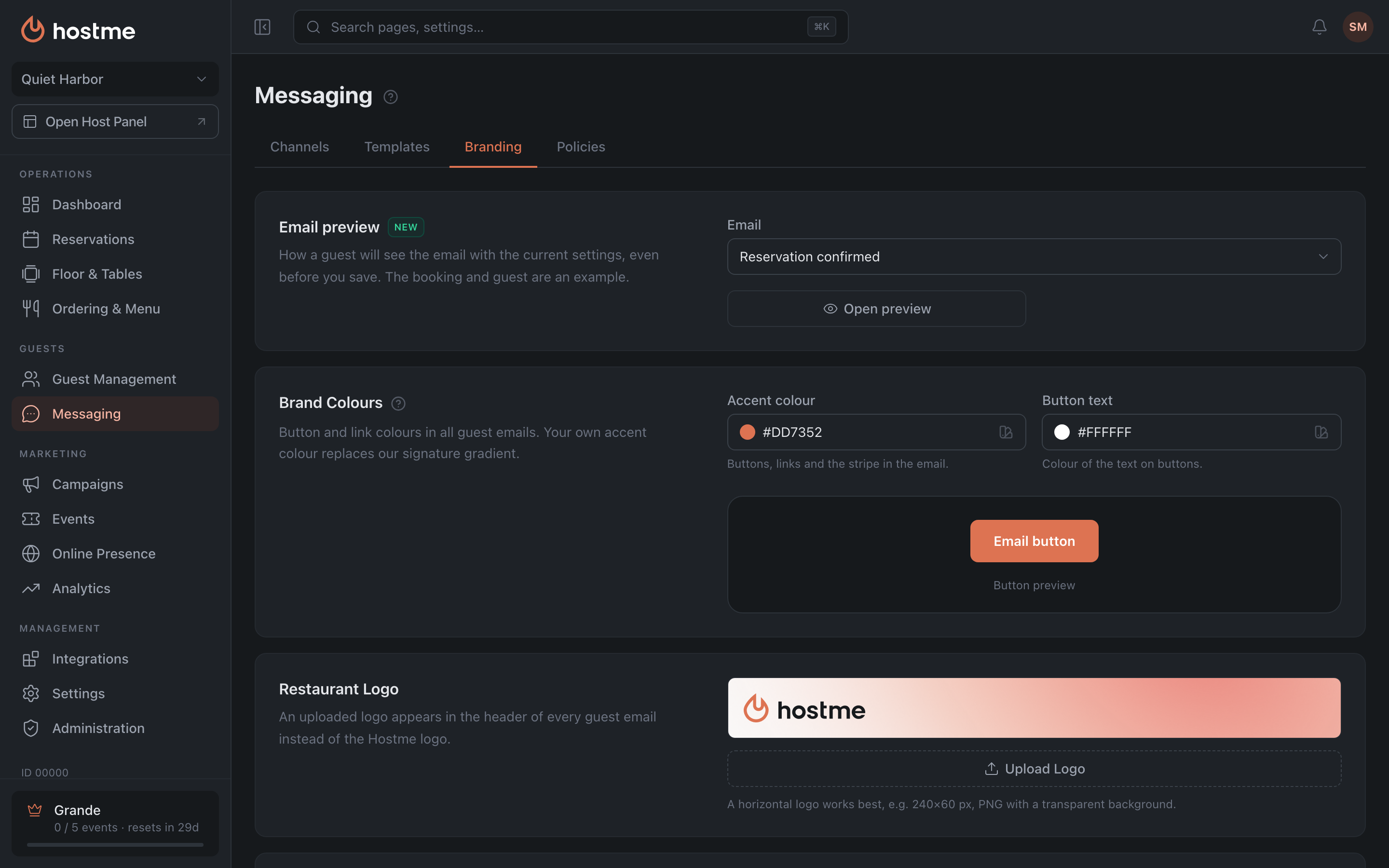
We fully redesigned the emails your guests get: reservation, waitlist and order. Everything about how they look now lives on one tab, Messaging → Branding. At the top is a preview: open an email and see it the way a guest will, before you even save, and the header with your logo and color updates as you go. On the Grande plan you can put your own logo in place of ours, pick the color for buttons and links, add a promo block with an image, and put the restaurant’s contacts and your social links in the footer. Going back to Hostme’s colors takes one click. And the Details in the email block decides what the guest sees: table number, area, deposit, requests, the button to change the booking, your policies. More in the Messaging article.
Also in this release:
-
Notification channels. Each guest notification has its own switch for every channel: for example, you can skip the SMS for a booking confirmation and keep messengers. Telegram now has its own text, as WhatsApp already did. A guest gets a notification through one channel, the first one that delivers it. If a channel fails or there’s no delivery report within 7 minutes, it goes out through the next one. More in the Messaging article.
-
Templates. Any email can now be opened in a preview right away, not only sent to yourself as a test. Guest emails come in the venue’s name, and guest replies land in the restaurant’s notification inbox. Undo now works in template and campaign texts: Ctrl+Z (Cmd+Z on a Mac).
-
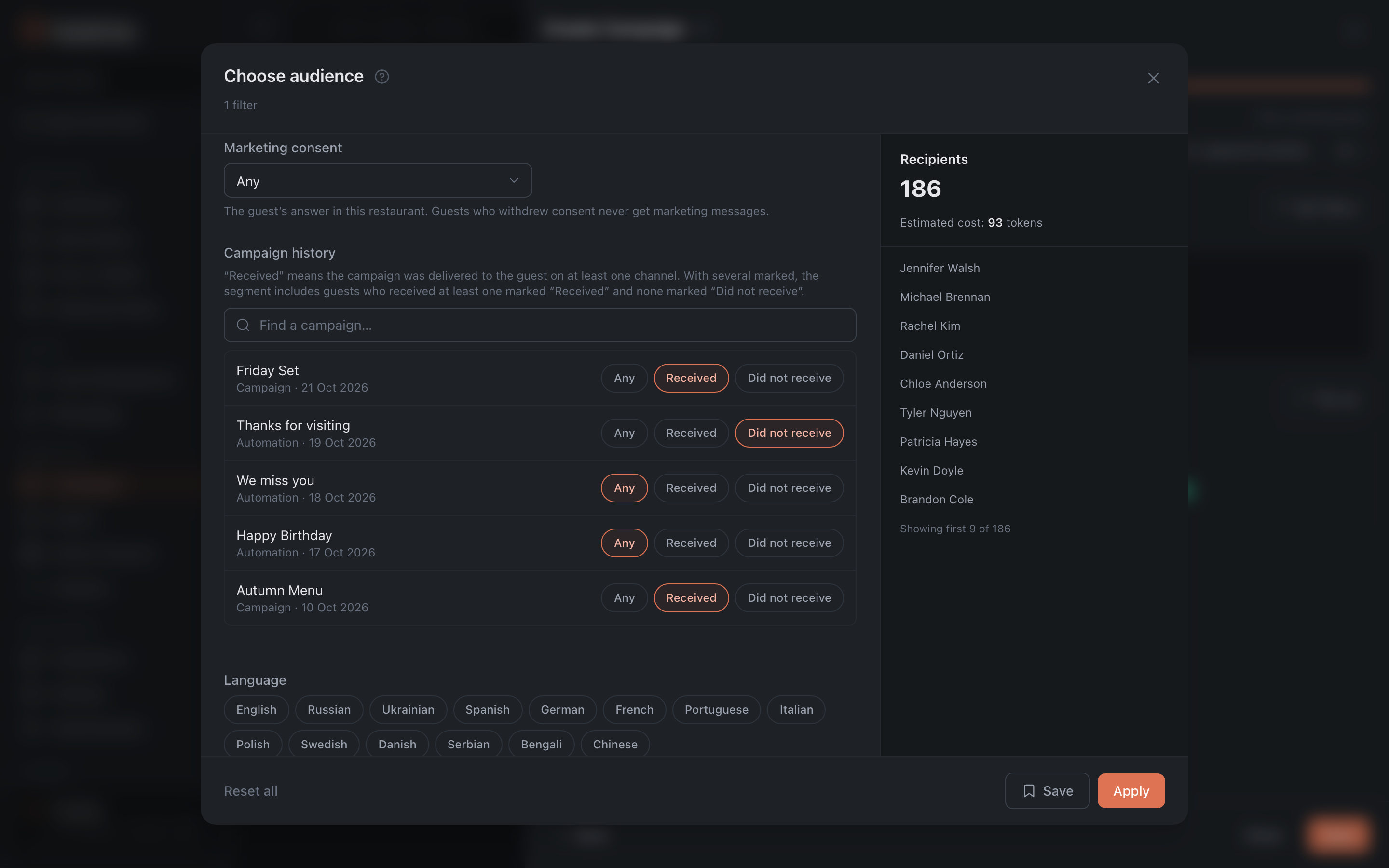
Campaign history. In segments and filters you can pick guests who did or didn’t receive specific campaigns. “Received” means the message actually reached them, not just that it was sent, so repeating an offer for those it never reached is easy. The “Visit date” window in segments grew from 90 days to 2 years. More in the Segments article.
-
Campaign statistics. Marketing SMS and WhatsApp count their statistics and clicks again, and we recalculated older campaigns: Reports show them even when there’s no statistics. If the carrier sent no delivery report, we say so: “No delivery data”. And the guest’s “First Name” works in campaigns and templates again.
-
Subscription and billing. Before you change plans, you see how much we’ll charge right now and to which card. A downgrade starts from the next period, and until then you can undo it with “Keep my current plan”. On a trial you can switch between monthly and yearly billing. Campaign tokens are a click away on the balance button. Billing History now shows every payment, including the subscription, a shared network invoice is marked “Paid by the network”, and SMS charges are labelled as SMS. More in the Billing and subscription article.
-
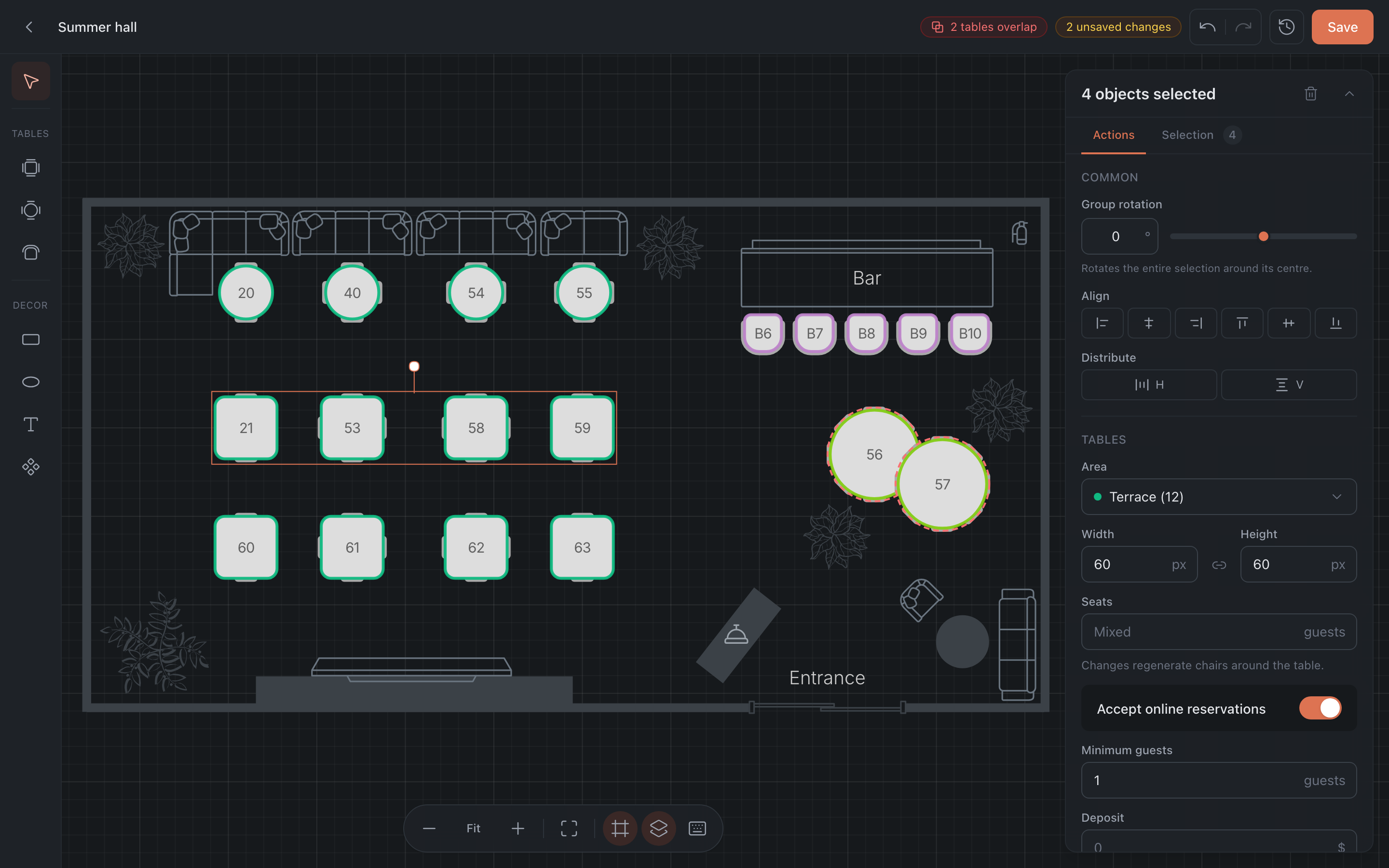
Floor builder. Select several tables and change the area, seats, online booking, minimum party and deposit at once. Tables that overlap are highlighted. More in the Floor builder article.
-
Diagnostics. The profile menu has a new Diagnostics page: in about half a minute it checks your browser, clock, time zone and connection to our servers, and shows only what needs attention. You can send the report to us straight away.
-
A few more things. Integrations got a tidy-up: clear names and descriptions, and connection errors right on the card. The role permissions from the last release now work in full. The event counter shows how many days are left until your quota resets. If a payment is overdue, Grande features stay visible but can be edited only after paying, and emails with your branding keep going out.
Also fixed: guest and staff emails look right in Outlook, and service emails to you and your team always come from Hostme. Seating Areas count tables and seats correctly: only on floor plans that are switched on, and without duplicates. If a segment would include more than 100,000 guests for the period, the admin asks you to shorten it. Your own Telegram bot connects without an error. Links in SMS and WhatsApp campaigns no longer carry the guest’s email address. A paid app doesn’t get connected until the payment goes through, and turning off a dedicated number stops the charges. A booking whose deposit hold failed no longer looks as if a card is attached. Analytics counts “today” by the restaurant’s clock. We removed “Invitation” and “Invitation accepted” from the booking templates: those emails haven’t been sent for a long time. The Serbian interface shows dates in Latin script, and we proofread the whole Bosnian translation.
A big update to the admin
October 14, 2026 · v.26.10.14
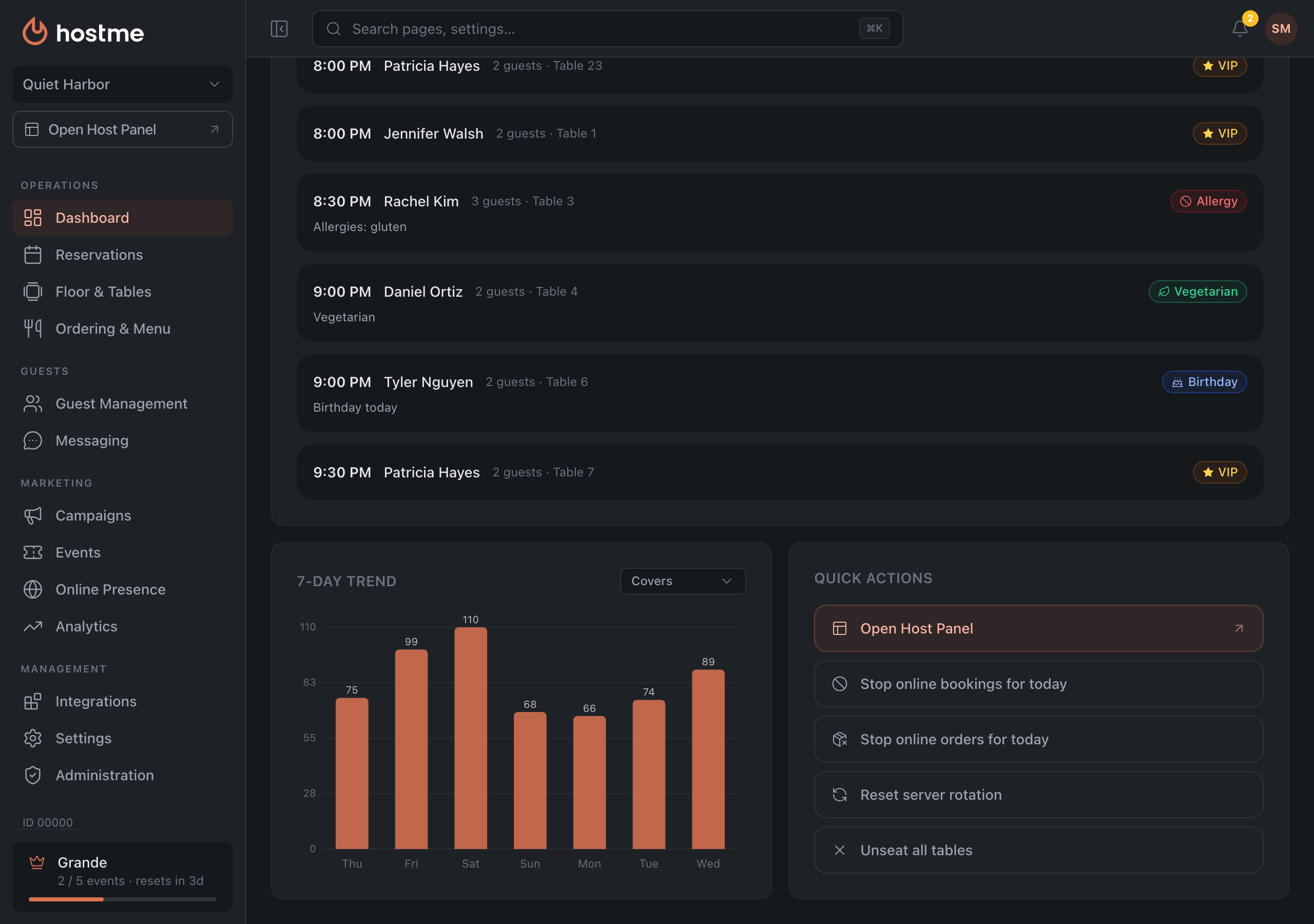
Roles are clearer, online booking and the online waitlist each have a main switch, and online orders can be stopped right from the dashboard. Next to the booking pause, the dashboard has a Stop online orders for today button — for when the kitchen can’t keep up or there are no couriers. The status bar at the top now shows separately whether online orders are open today. More in Dashboard.
Also in this release:
-
Roles and permissions. «Support» is now only the role of Hostme’s own support team: a restaurant can no longer grant it. The marketer works across all guest and marketing sections and sees all analytics except orders; they can edit guests but not delete them. IT Support owns integrations, channels, templates and campaigns. Both land straight in their own section — Campaigns and Integrations — and can switch between the chain’s restaurants if they were added to several. A manager can change anyone’s role except the owner’s, and a host, marketer or IT Support can only invite colleagues with their own role. The last owner of a restaurant can no longer be removed — assign another owner first. Some of the new permissions start working with a server update in the coming days. Who sees what — in the Roles & Permissions table.
-
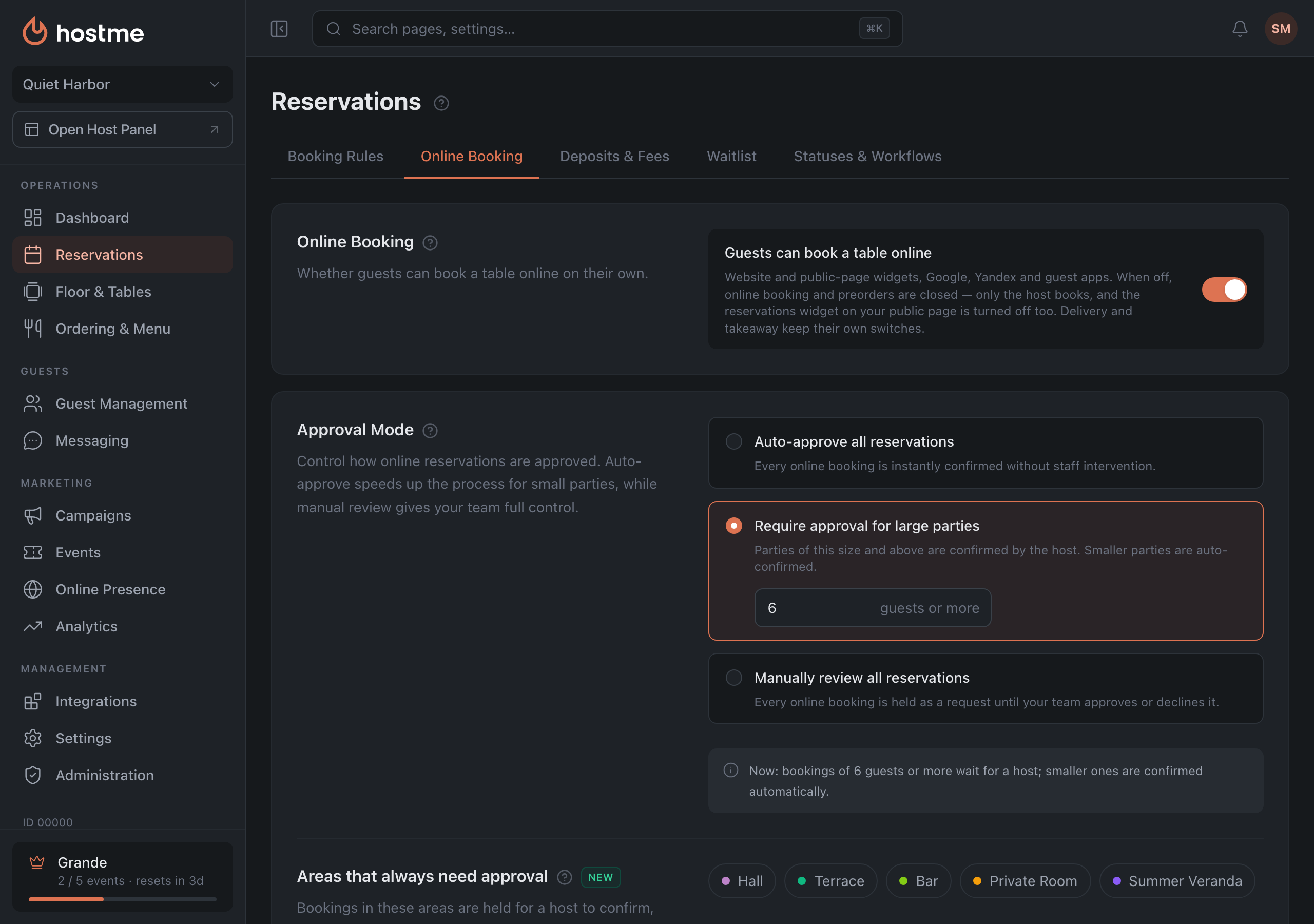
Online booking — one switch. The Online booking tab has a main switch: turn it off and online booking is closed everywhere, from the website to Google. Visit duration can be set from 5 minutes up to a day. The setting that closed a reservation right on seating is now called exactly that — «Close the reservation as soon as guests are seated». More in Online Booking.
-
The online waitlist too. Turn it off and guests cannot join the line from the website, the app or a QR code, and the waitlist widget on the public page is hidden. Auto-call does exactly what it says: a guest can be called automatically when a table frees up, and you set how long to wait for a called guest. More in Waitlist.
-
Orders in analytics. The average check uses the real order total, and delivery time runs from hand-off to the courier to the order being closed. All deliveries, takeaway and pre-orders for a period can be exported to a file straight from Analytics → Orders — see Analytics.
-
Guests and campaigns. In the guest profile, the Reservations tab shows the guest’s upcoming bookings, with the average check at the top. The profile also shows the guest’s marketing consent for your venue specifically, with a switch, and segments get a consent filter. Automatic tags show in the profile with their own icon, and a wrong auto-tag can be removed. More in Guests.
-
Loyalty program. Marketing now has its own loyalty program: points for visits and paid checks, earning and redemption rules, guest cards with balance and transaction history, coupons, and the program terms guests see. We’ve started testing it with a limited group of restaurants — if you’d like to be among the first, let us know.
-
Integrations. After «Connect», the admin shows that the app is connected and opens its settings right away instead of hiding the card.
-
Subscription. A plan can only be changed with a card on file: before the change you see the new plan and the amount, and the difference is charged right away.
-
Small things worth knowing. User and restaurant profiles now have a country picker for the phone number. When adding a restaurant, you can choose whether it shares the chain’s guest base or has its own. The password reset email arrives in the language you filled the form in. And in time pickers the «To» list starts from the selected «From» time.
Also fixed: seating areas count tables and covers honestly — only on enabled floor plans and without duplicates. An overnight block like «03:00 to 01:00 the next day» is no longer saved as a block of almost a whole day, and if you remove the last table from a period, the admin asks first instead of quietly closing the whole floor. Segments with booking conditions count again, and re-saving an old campaign no longer sends it to the whole base. The guest book export gives exactly the guests you see in the list, and chain restaurant filters in segments count more accurately (fully with a server update). Automations with both email and WhatsApp no longer lose the WhatsApp part on save. Weekly events are saved with their dates, and an event’s seating settings no longer roll back after saving.
Three months of analytics
October 5, 2026 · v.26.10.5
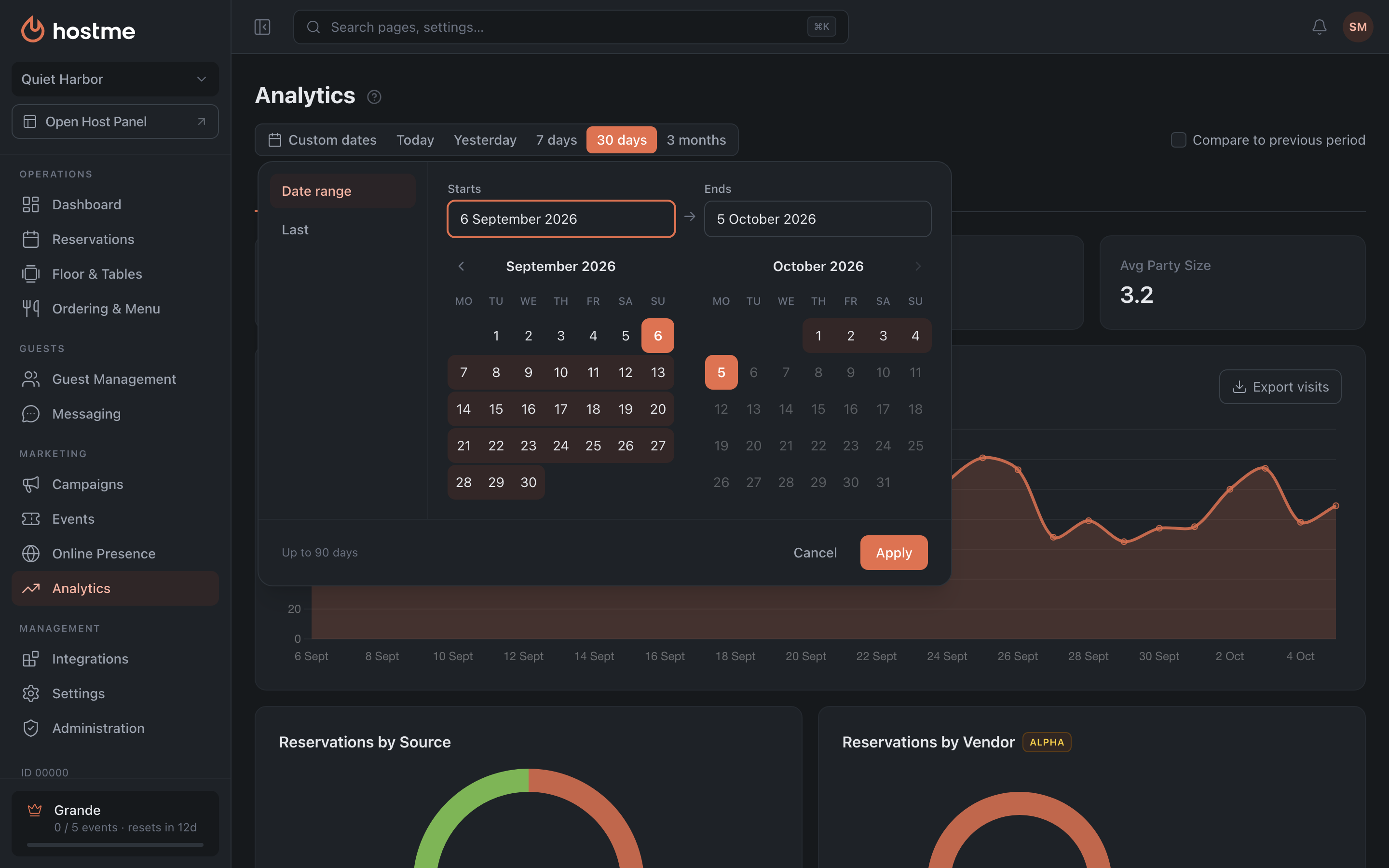
You can look back up to 90 days, pick your own dates or a calendar month, and a single day is broken down by the hour. For monthly reports there is a creation date in the bookings export and a new export of all visits, walk-ins included. More in Analytics.
Also in this release:
- Staff emails — on the new templates for everyone. Booking and order notifications have moved to the new templates for every restaurant, not only those already on the new panel. There is now a separate booking request: a request waiting for approval can no longer be mistaken for an ordinary booking. A cancellation shows the guest’s reason, and the emails about a trial ending and a failed payment have finally started arriving.
- Campaigns and automations. The segment filters by visit dates and events now work. When the audience is larger than one send can reach, the preview tells you honestly how many will get it. “N days before” and “N days after” automations now fire on their own day rather than on the day of the event, and before switching one on you see how many guests will get the message. Older automations with these conditions are worth saving again.
- Small things. Working hours gain “24 hours”, and SMS templates show how many messages a text will cost. The email promo is gathered on the Branding tab, searching for “push” leads to the notification settings, and floor plans show who edited them last. There are now two Chinese — Simplified and Traditional; Norwegian has been translated afresh and Croatian proofread.
Also fixed: the “pending deposits” card now sees unpaid deposits for a month ahead. Cancelling an order from the restaurant’s side, saving a product category, dishes in a new modifier, removing the logo and colours from emails, New guests and the waitlist in analytics all work now. Date filters no longer drop the last day, and a campaign that failed to launch no longer stays silent. The “Add restaurant” window in Administration got the same fix as sign-up — clear errors and a phone with a country code. The VIP tag no longer drops off a guest when a booking is saved. After a subscription is renewed, campaigns, SMS, WhatsApp and push notifications work again — connections no longer stay paused. And older restaurants that had no country set now have one: it decides, for example, which day the week starts on in schedules.
Every device picks its own notifications
September 21, 2026 · v.26.9.21
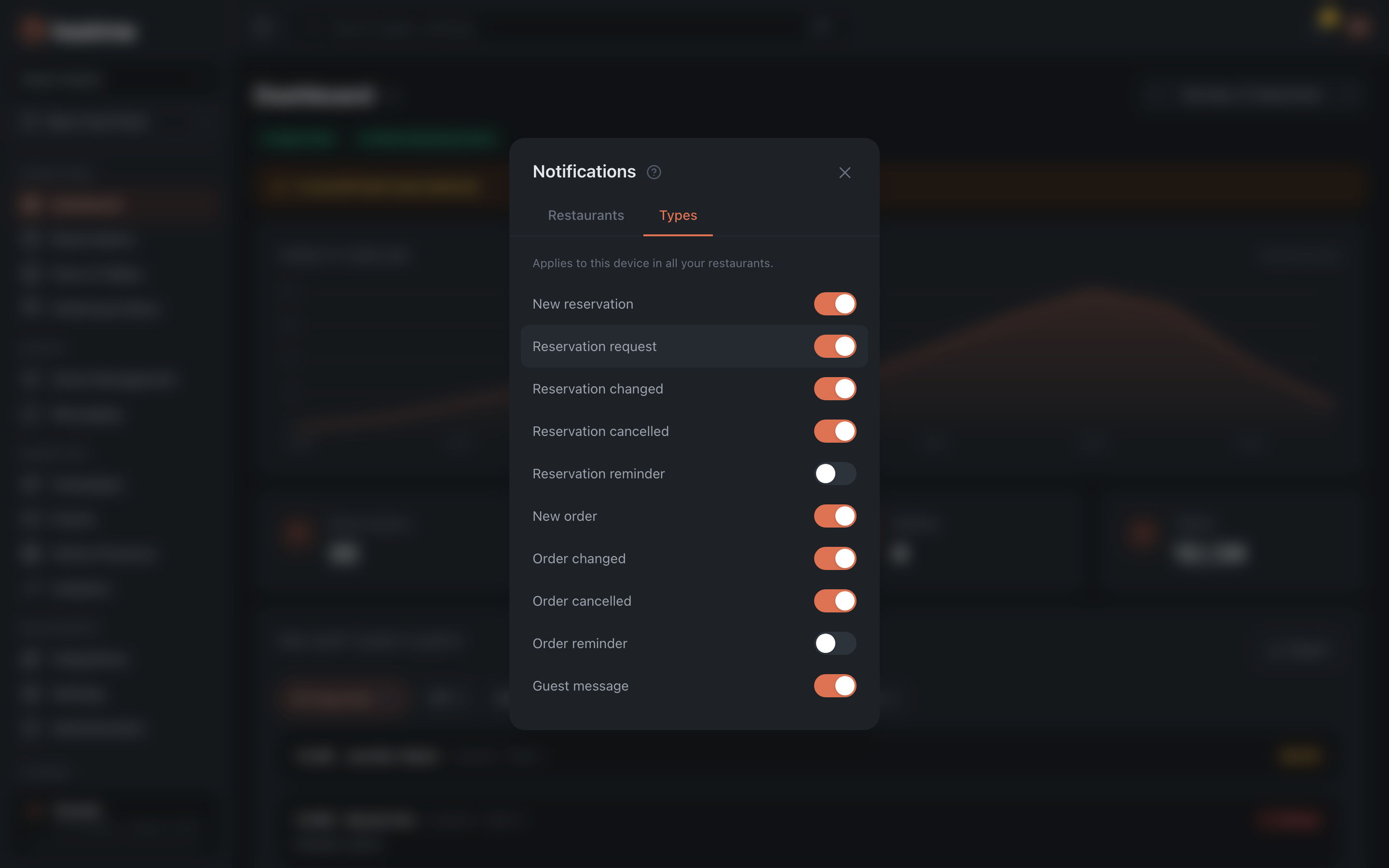
A phone or tablet used to receive every notification there was, and the only way out was to switch them all off at once. The notifications window now has a “Types” tab: new booking, change, cancellation, orders, guest message — each device ticks what it needs. The choice applies across all of your venues, so there’s nothing to set up venue by venue. How notifications work end to end is in Panel notifications.
Also in this release:
- Staff hear about orders again. Notifications about delivery and takeaway orders never reached the team — no email, no push, no chat message — while the guest received everything as usual. Fixed: you now hear about orders the same way you hear about bookings.
- Old floor plans open in the builder again. A plan left untouched since the days of the old Admin opened with an error. It is now read as it is.
A hint on every screen
September 9, 2026 · v.26.9.9
We went through the help centre from end to end: checked every article against the live product, rewrote what no longer matched and filled in the steps that were missing. Thirteen new articles, ten step-by-step guides and over three hundred screenshots. The English version is now as complete as the Russian one.
The bigger change is that help moved inside the Admin. A help icon now sits by every section title and next to the settings themselves: tap it and you land on the article about that exact screen, not on a table of contents. Where people get stuck most — the floor builder, table rules, deposits, the waitlist, the menu, the booking widget, events, segments — there are links to step-by-step guides.
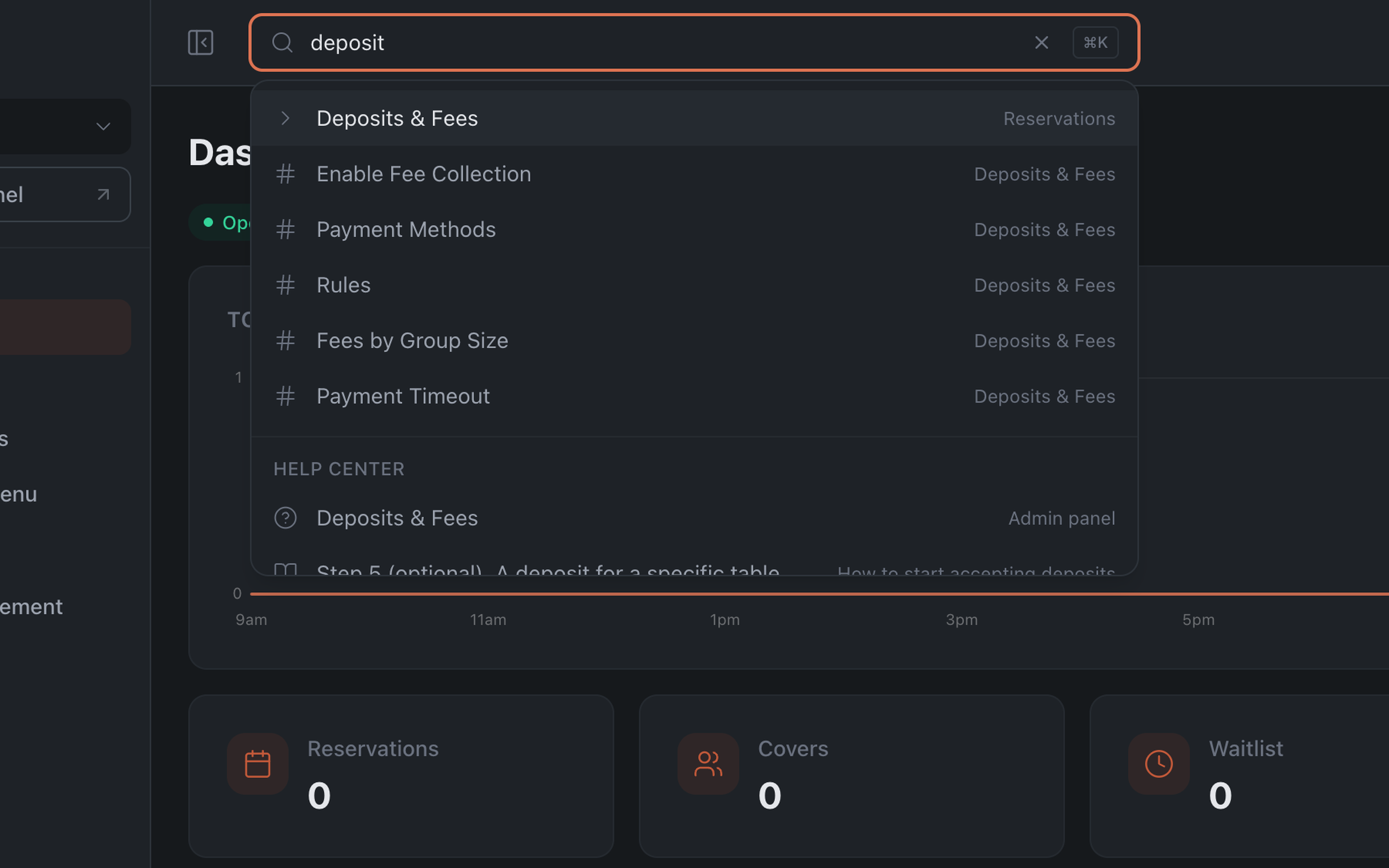
Search inside the Admin now covers the help centre too. Type “deposits” and you get both the settings page and the articles on how to set them up. You can ask in your own words instead of guessing what the screen is called.
And reaching us got simpler: the profile menu opens a chat with Hostme support — write any time, we usually reply within minutes.
Seating areas got smarter
August 26, 2026 · v.26.8.26
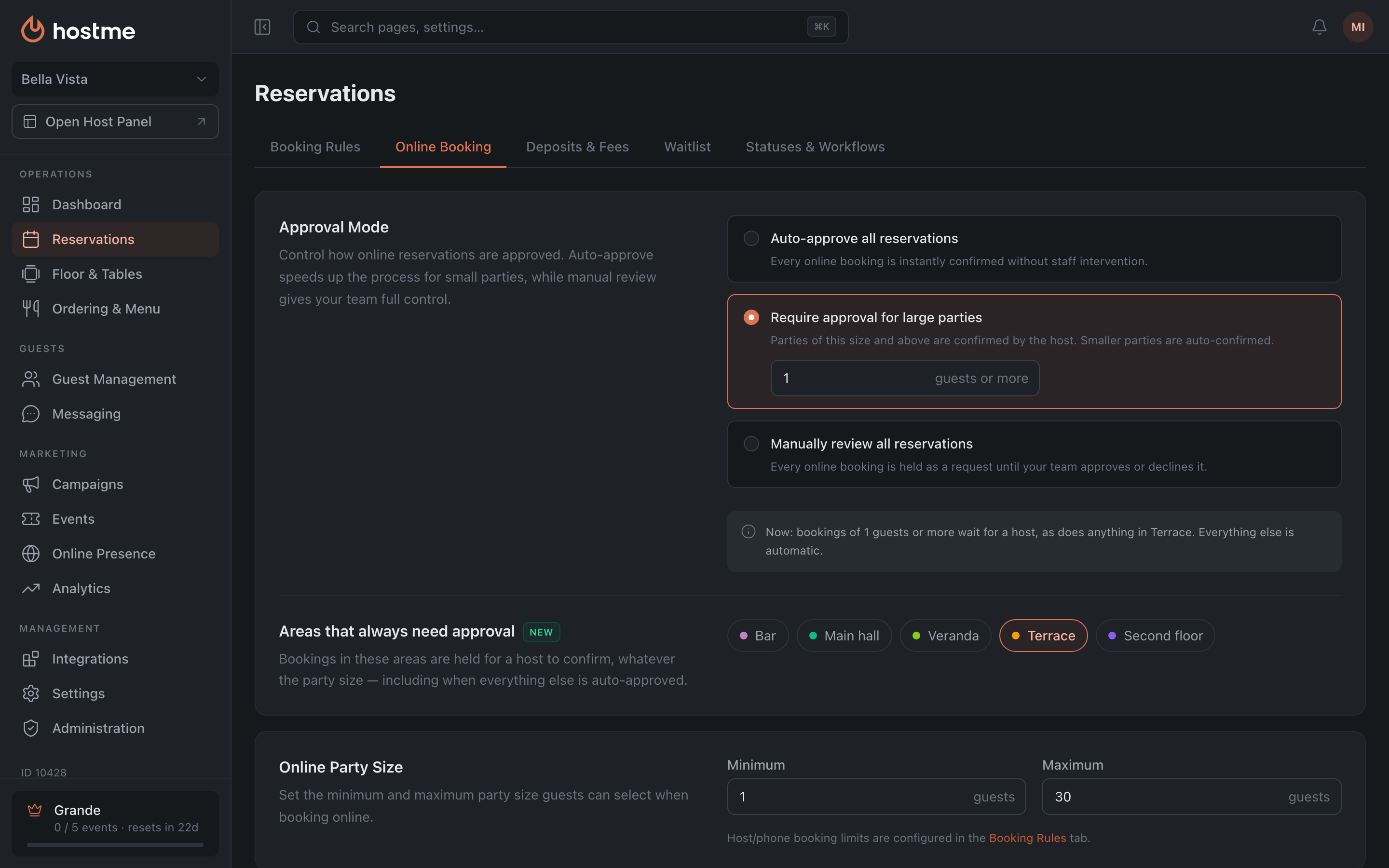
- Areas got an upgrade. An area now has its own color and its own list of tables, and it belongs to the restaurant rather than to a single floor plan. Old pains went away with it: tables no longer fall off an area after it’s renamed, an area no longer vanishes from the settings list (while still working on the map), and its color in the Host Panel matches the one picked in the Admin.
- An area can require host approval. Bookings in such an area are approved by a person regardless of party size — even if everything else is auto-approved. Handy for a patio, a veranda or a banquet hall.
- Hostme now speaks 21 languages — we added Norwegian, Turkish, Greek, Croatian, Portuguese (Brazil) and Spanish (Latin America). Guest emails go out in these languages too.
- You won’t lose bookings anymore when editing the floor. Deleting a table that has bookings for next week — Hostme warns you in advance and asks again. The decision is still yours: the guest may already have been moved over the phone.
- Small things that save time every day: the restaurant number is shown next to the name and copies with one click (useful when you write to us), the Host Panel button is back in the left menu, and the profile menu now has a link to the Help Center.
Also fixed: the disappearing booking hours, saving tabs after deleting all rows in rules, saving the profile, the email to a new team member, extra guests in the export, and the channel breakdown in analytics.
Fixed switching to the panel
August 22, 2026 · v.26.8.22
A restaurant on the new Admin but still working with the old Host Panel landed in the old version when switching to the Admin — with no way back. The switch now works correctly; the same applied to the new mobile app.
Booking analytics by channel
August 18, 2026 · v.26.8.18
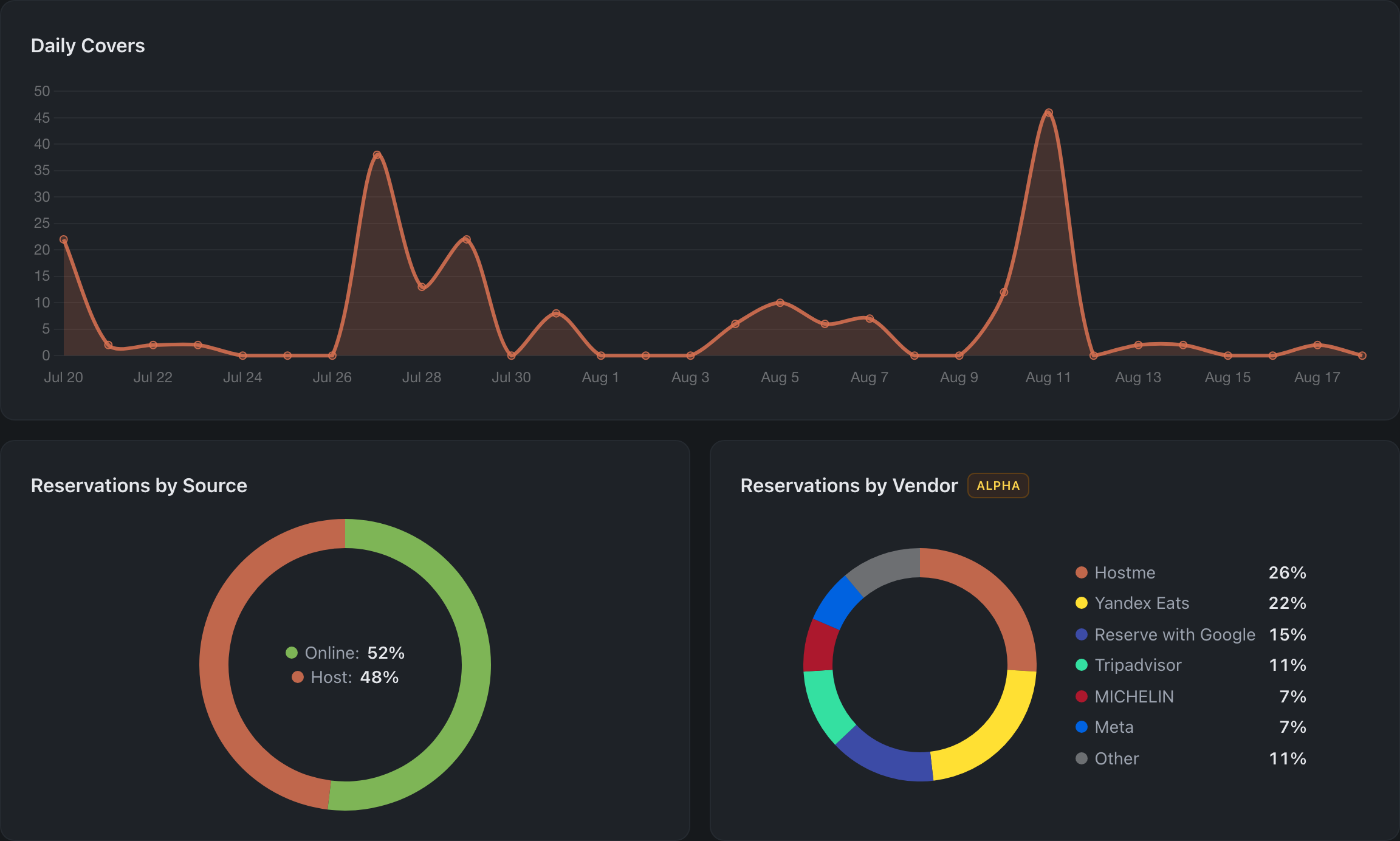
- Bookings by channel. The Overview got a second donut — which channels online bookings come from: Reserve with Google, Tripadvisor, MICHELIN, Meta and our own widget with the public page. Shares and percentages are calculated for the selected period. The card is marked ALPHA: the breakdown will fill in once channel tagging lands — for now all online bookings show as a single Hostme segment.
- Export bookings to CSV. The Reservations tab got an “Export bookings” button — every booking for the selected period, both host and online, with status, guest, phone, table and deposit. Source and channel are separate columns, so you can slice by host, online or a specific channel right in Excel.
- Accurate SMS cost. Long messages were counted as one, so the mailing price was shown too low. The cost is now calculated per segment — exactly the way billing charges it.
- A clear approval threshold. The label contradicted the behavior: the heading promised auto-approval “up to and including N”, yet a booking for exactly N guests was already sent for approval. We didn’t touch the behavior — we rewrote the wording: “Require approval for large parties”, with the field labeled “guests or more”.
Redesigned all system emails
July 30, 2026 · v.26.7.30
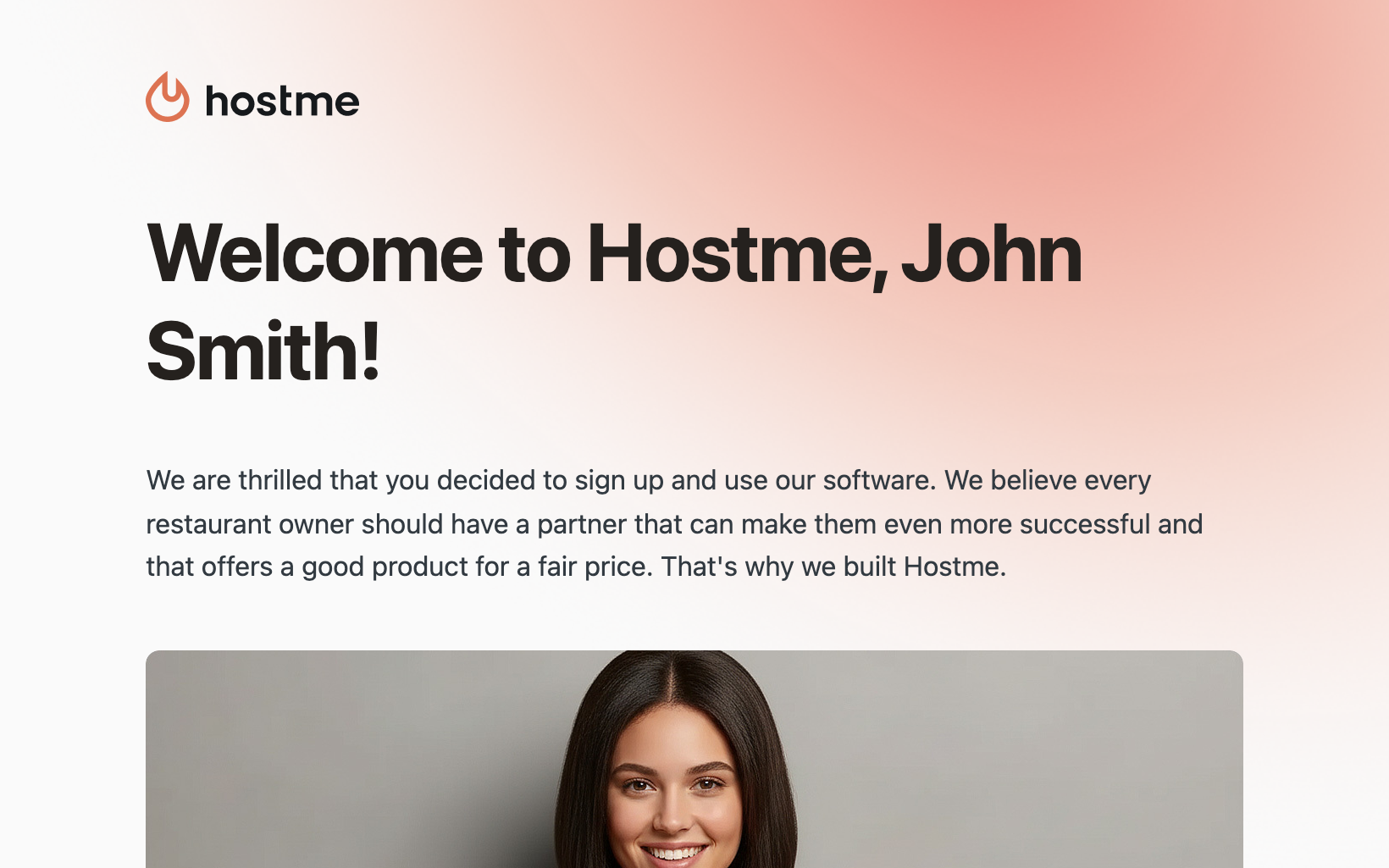
Every email a restaurant receives from Hostme — a team member invitation, a welcome, a subscription invoice, a payment reminder, a verification code, a password reset, a notification about a new website lead — now comes in a single new design.
- Modern clean style, the recognizable Hostme look
- In the client’s language — 15 languages
- Clear invoices and statements with full details
- Equally readable on a computer and on a phone
Cover Pacing and single sign-on
July 29, 2026 · v.26.7.29
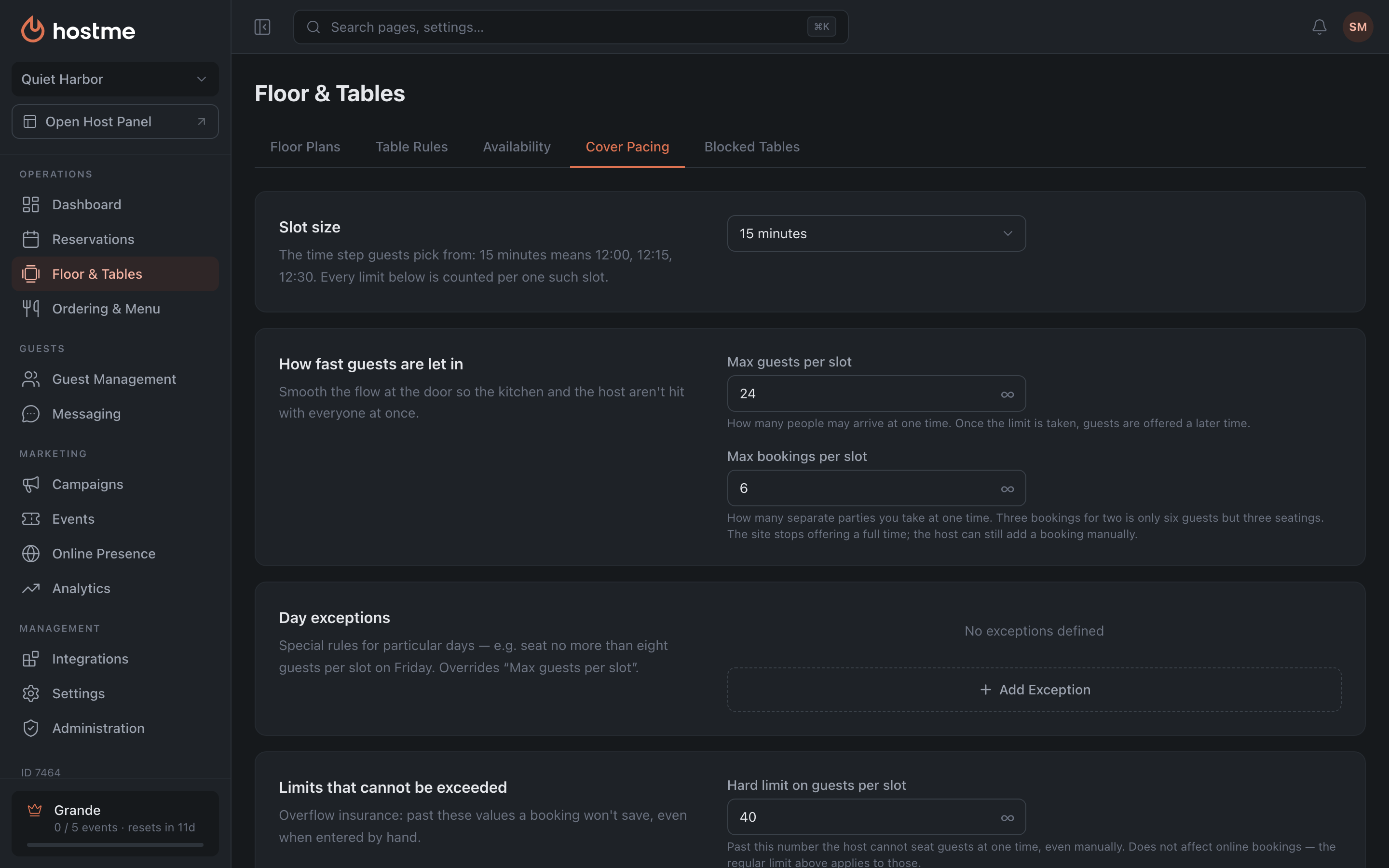
- Cover Pacing — rebuilt from the ground up. All eight capacity limits are now on one tab (some used to hide in “Online Booking”, which was confusing). The labels were rewritten in plain language. Slot exceptions finally work for real: a special limit for a day and time (say, Friday 19:00–22:00), and online guests now see it too, not just the host.
- Single sign-on for the Admin and the panel. Sign out of the panel — and you’re signed out of the Admin. One account, one session.
- Self-service account deletion. GDPR erasure right from the profile, without contacting us. If an active subscription or being the only owner with a team stands in the way — the Admin tells you what to do first.
- Blocked tables. The PIN no longer gets the sign-in password filled in. Blocking “all tables” now really blocks all of them. All rules can be deleted at once.
- Team, guests, emails. An invited person who is already registered appears in the list right away, no reload. The guest card shows the phone. 4 hidden email types are now shown and a non-existent template was removed.
- Reservations, slots, orders. Deposits again detect the payment provider on “Reservations”. The “Enable all” button in slots works again. The default order limit per slot is unlimited.
- Small things that had been in the way for a long time. Cancellation reasons are now in the restaurant’s language. Guest export to CSV — with all columns. A new restaurant gets the time format of its country.
Launched the Help Center
July 16, 2026 · v.26.7.16
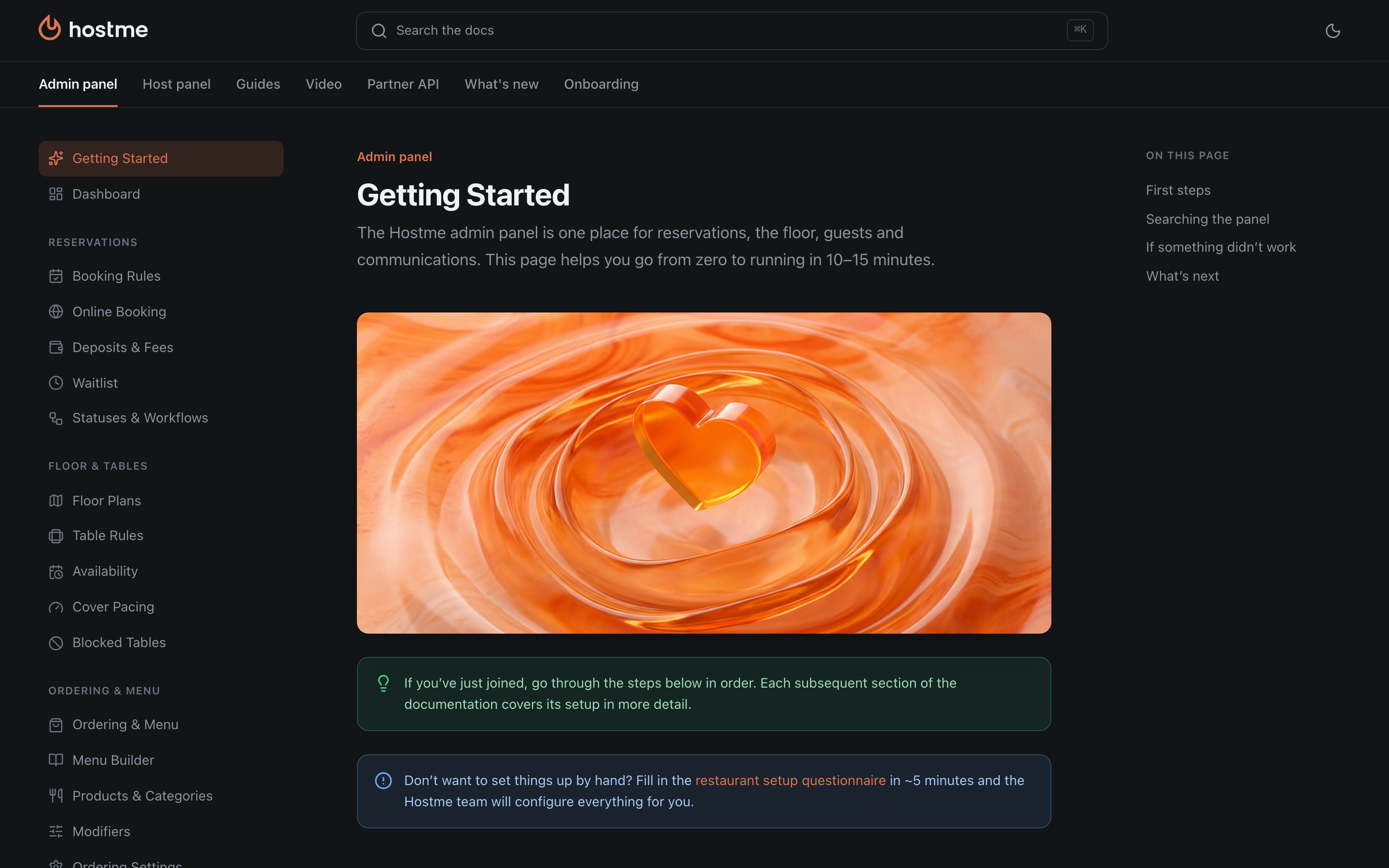
- Launched the Help Center — docs.hostmeapp.com. A single knowledge base on Hostme: how the panel works, step-by-step guides, dark mode and quick search. This “What’s new” page lives there too.
- “Quick walk-in seating”. We renamed the setting from the vague “Quick walk-in booking”: the point is to seat a guest without a booking in one click, without asking for a name and phone. Search now also finds it by “seating”, “walk-in” and “no booking”.
- Owners manage owners. A restaurant owner can now change the role of another owner or remove them — these buttons used to be hidden for everyone.
- Fixed the floor map for restaurants that operate past midnight: it could fail to load on “night” shifts.
Hostme on the App Store and Google Play
July 14, 2026 · v.26.7.14
Hi! We’re Hostme.
Chances are you already know us. We’re the ones answering you in chat at 23:47, coming to your restaurant, arguing with you and shipping the features you asked for. For many restaurants we stopped being a “service” long ago and became part of the team. And that’s the best thing that has ever happened to us.
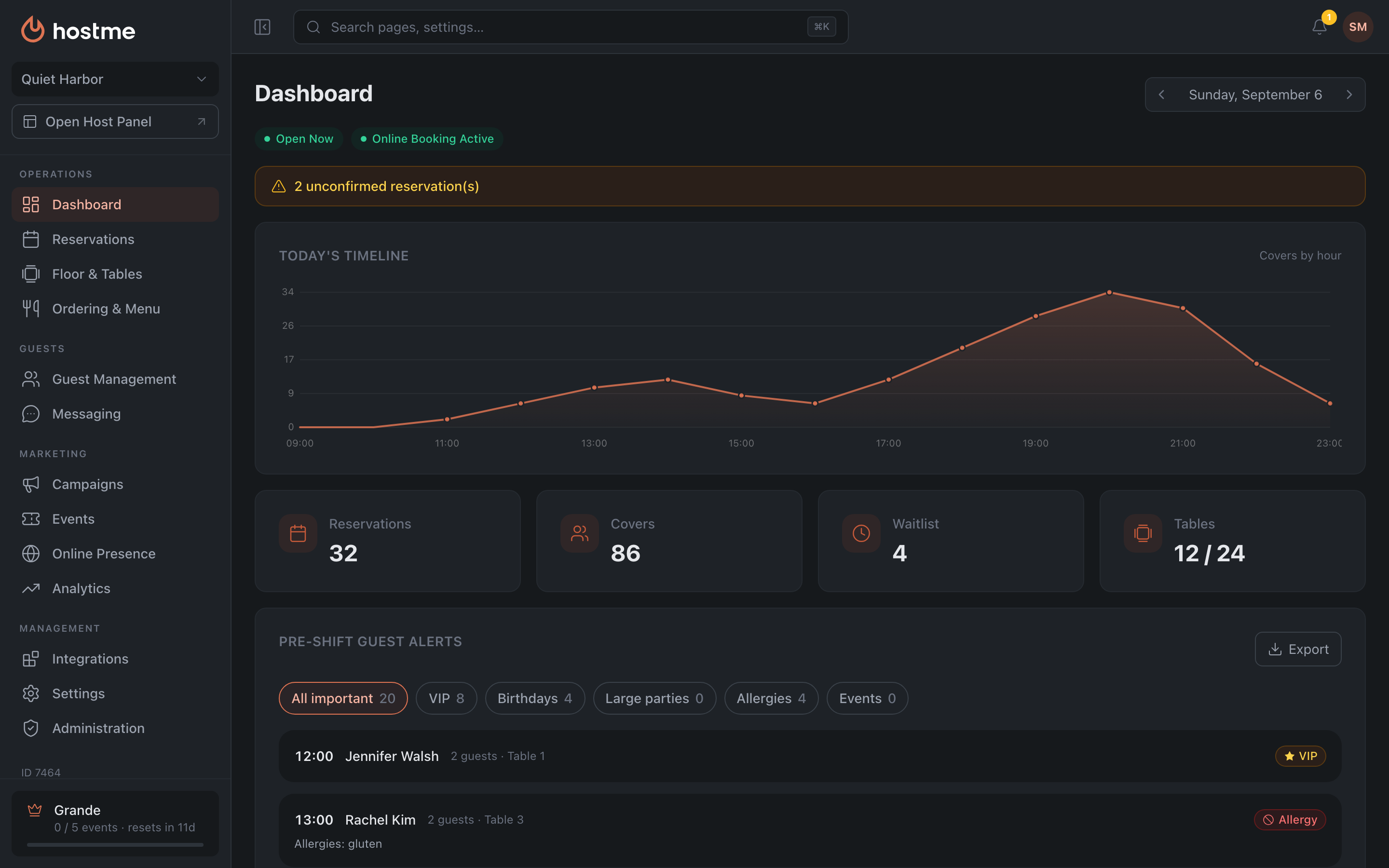
So here it is. We took everything we learned alongside you over these years and rewrote the app from scratch — and the new Hostme is out on the App Store and Google Play. We didn’t repaint the buttons — we rebuilt it. It’s noticeably faster, smarter and, honestly, just nicer to use.
What’s inside:
- Guest Book and a full CRM — the thing you’ve been waiting for, and we finally did it properly. We remember every guest: visit history, favorite table, allergies, birthdays. Tags and auto-tags sort guests into neat groups on their own, and from there — segments, campaigns, reports and funnels. A guest comes in for the second time — and it feels like you’ve known each other for ages, and you even know what to offer them.
- Floor timeline — the whole load over time at a glance. You immediately see where it’s packed, where it’s empty and where to seat a party of eight.
- Chats from every channel in one window — SMS, WhatsApp, Telegram and the rest are no longer scattered across ten tabs.
- Call history — who called, when and what about. Nothing gets lost.
- Dashboard and clear reports — bookings, guests, floor occupancy on one screen. In plain language, without tables you need to decipher.
- Floor map — drawn like in a proper editor, not “a millimeter at a time with the mouse”. And we also added generation from a photo or even a hand-drawn sketch!
Plus dark mode, a quick search that finds anything in a couple of seconds, and a hundred more little things you asked for and we remembered.
Honestly and up front: this is still a beta. We tried very hard, but a few things are still being polished. Spotted something odd or inconvenient — write to us! We really do read every message and fix things fast. Your wins are our wins, and the rough edges are our responsibility.
Thank you for being with us. Let’s go!
— The Hostme team