How to close online booking for a holiday or a date
Block online reservations on specific dates (holidays, special events) — with an optional yearly repeat.
If the restaurant is closed or booked for a special event, close only online booking on those dates — staff will still be able to book manually.
What to do
-
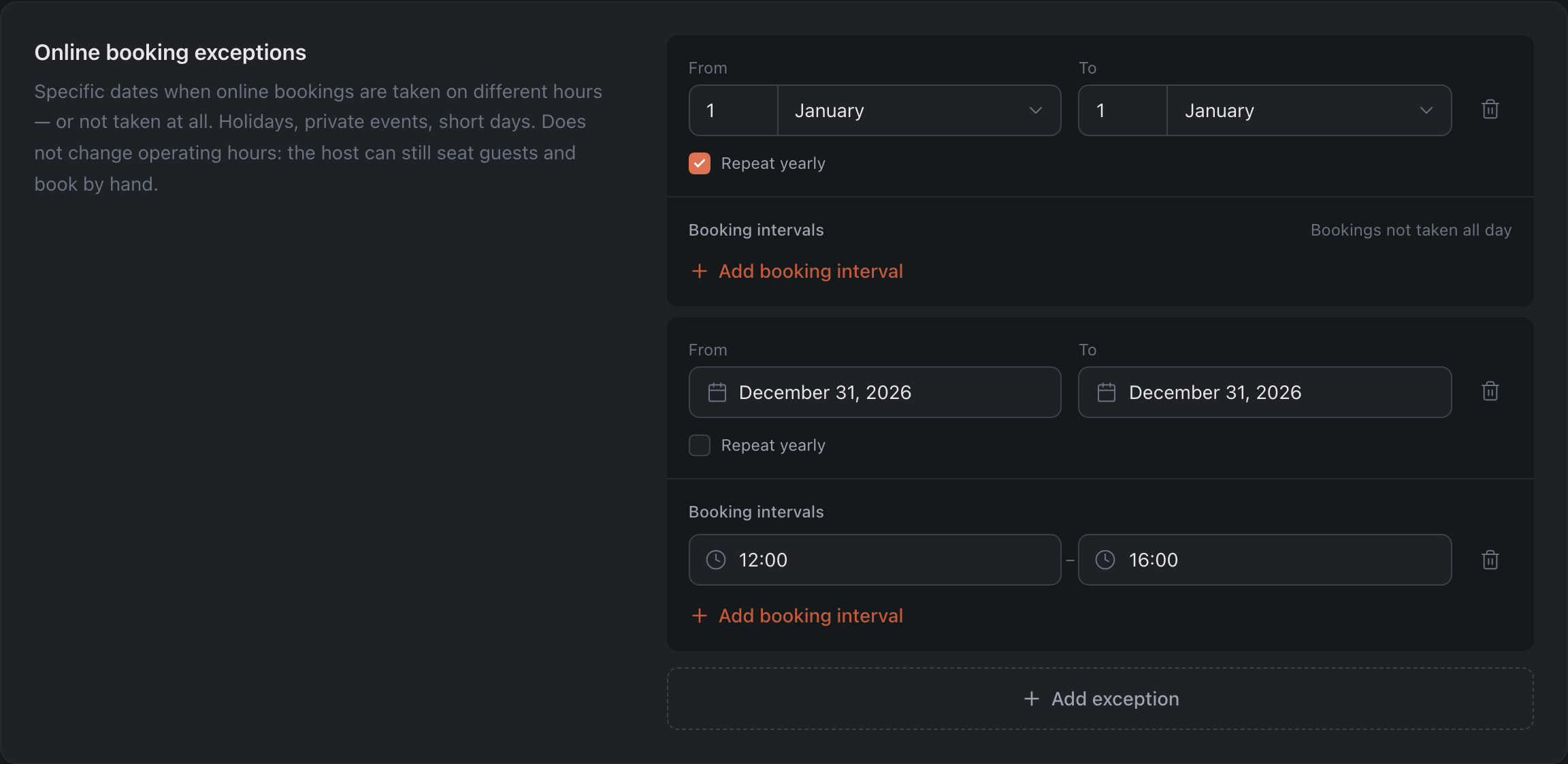
Open Floor & Tables → “Availability” tab → the “Online booking exceptions” section.
-
Click “Add exception” and set From / To — the dates the exception applies to.
-
Check “Repeat yearly” if the date repeats every year (for example, January 1). The date fields switch to a “day + month” format — no need to specify a year.
-
To close the day completely, do not add any intervals: next to the “Booking intervals” heading you will see the label “Bookings not taken all day”. If, however, reservations should still be accepted on that day during certain hours (for example, a shortened day 12:00–16:00), click “Add booking interval” and specify them: online reservations will be accepted only within the specified intervals, and the rest of the day is closed.
-
Click “Save Changes”.
Result: on the selected dates guests will not be able to book online — and if you set booking intervals, only within them. The restaurant’s operating hours do not change: the host still seats guests and creates reservations manually.
Related: Pause online booking urgently