How to greet a guest with a booking
The guest has arrived: find their booking, mark that they're here and seat them. What to do if the guest is late or doesn't show up.
A guest comes up to the host stand and gives their name. You need to find the booking quickly, mark their arrival and seat them at their table.
What to do
-
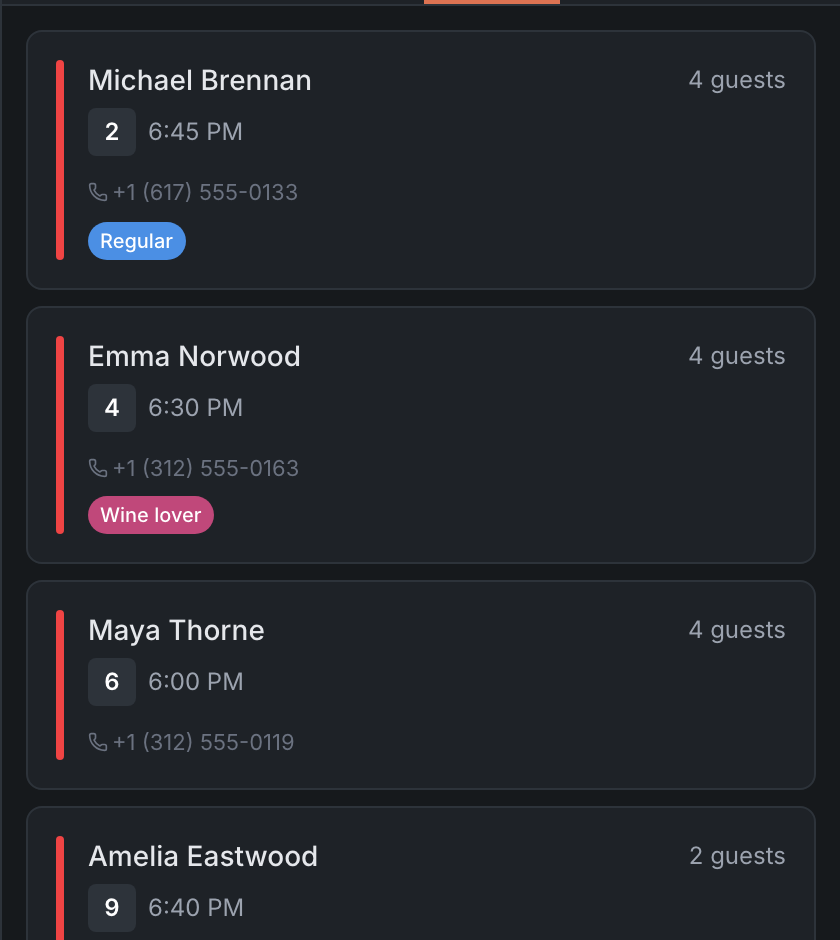
Find the booking. The quickest way is the side list on the Map, the Reservations tab: the shift’s bookings by time. Or on the Reservations tab — the Search by name or phone field.
-
Open the booking card — tap the booking.
-
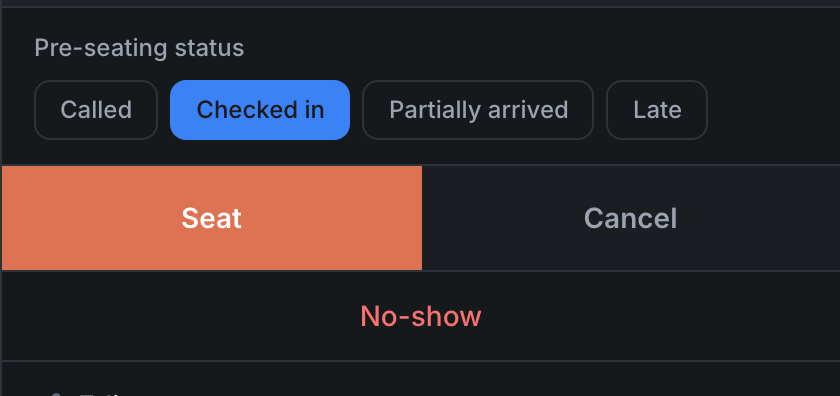
If the table isn’t ready yet, tick Checked in in Pre-seating status — colleagues will see that the guest is already waiting. If only part of the party has come — Partially arrived.
-
Tap Seat. If the booking has no table — Assign table, pick a table and then seat.
Result: the guest is at their table, and the booking has the Seated status.
If the guest is late. Once the booking time has passed, the booking gets a Late badge. You can tick the Late chip in Pre-seating status and call the guest — the phone is in the booking card.
If the guest doesn’t show up. Open the booking and tap No-show — the panel asks first. If the booking had a deposit, what happens to it depends on the restaurant’s rules.